
The computer laboratory
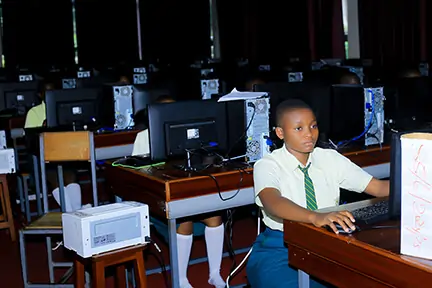
In our computer laboratory every student sits at their own computer. It is where ICT is taught, and where students of every subject come to research, revise and learn to use computers well. Each class block also has a digital board for lessons.
Applications are open for Senior 1, Senior 5 and transfer students.
A computer for every student
When a class comes into the lab, every student has a computer to themselves. No one shares and no one waits, so each student gets the full lesson at the keyboard.
Computer learning does not stop at the lab door. Each class block has a digital board, so teachers of any subject can show slides, short videos and online material in their normal lessons.
More about the lab
- 1One computer eachEvery seat in the lab has its own computer. In a practical ICT lesson, every minute at the keyboard counts.
- 2On the timetableICT classes are taught in the lab. Other subjects book lab time for research, assignments and online learning.
- 3Always supervisedA teacher is present in every lab session. Students use the computers for school work only, and the rules are enforced.
- 4Looked afterComputers are kept working and software is kept up to date. Students look after the computer they use and are responsible for any damage.
For parents: students do not need their own phone or laptop for school work. The school provides the computers in the lab and the digital boards in the classrooms.
O Level
ICT is a subject in the new lower secondary curriculum.
- Typing and word processing
- Spreadsheets and simple data work
- Using the internet and email safely
- Basic programming
- Project work for school based assessment
A Level
Students who take Subsidiary ICT have their lessons in the lab.
- Office tools used at university and at work
- Research and presenting information
- Computer skills needed for university study
ICT is also used in other subjects. The new curriculum expects students to use computers as a tool for learning, not only in ICT lessons.
Understanding
Videos and diagrams on screen can make a hard topic easier to follow than notes alone.
Revision
A student can go over a lesson again at their own pace until it makes sense.
Research
Students learn to find good information and use it in essays and projects.
Everyday skills
Typing, spreadsheets, email and online forms are used in almost every job.
Ready for university
Registration, assignments and library searches at university are done online.
Confidence
Students who have never used a computer at home soon feel at ease with one.
Online tests are planned as part of the school's management system. They are not in use yet. Whether they become part of formal assessment depends on guidance from the Ministry of Education.
- 1Sitting a testStudents would do school tests on their own computer in the lab. Multiple choice questions would be marked straight away.
- 2Marks go straight to recordsMarks would go into the student's record and the term report card, with no copying by hand.
- 3Teachers see results quicklyTeachers would see the class results when the test closes, so they can help weaker students sooner.
UNEB exams for UCE and UACE stay on paper. Online tests would only be used for the school's own tests.
Places for 2027
Apply for Senior 1 or Senior 5, or come and see the computer laboratory for yourself.